Local reviews
On this page
This guide runs a Flow code review on your computer, before you open a pull request. You will:
- Review your branch with your coding agent
- Review a range of commits, or ask for more
- Write the findings as an HTML report
Overview
Section titled "Overview"A local review runs the same lenses as a review on GitHub, with the coding agent on your computer. It needs no GitHub App, no workflow and no secrets. It reports every finding, with no maxFindings limit.
Reviewing your branch
Section titled "Reviewing your branch"Run the command in the folder of your app. It starts a session of your coding agent with the flow-code-review skill.
npx @adonisplus/flow reviewThe review covers each change since your branch left the default branch, with the changes you have not committed and the new files. When it ends, the agent prints the findings and saves them to tmp/code-review.json.
The agent is the one in flow.lock. When flow.lock has more than one, pass --agent with claude, codex, cursor or opencode.
npx @adonisplus/flow review --agent=codexReviewing a range
Section titled "Reviewing a range"Pass --base to review the changes from a ref up to HEAD. Add --head to end the range at another ref.
npx @adonisplus/flow review --base=main --head=featurePass --prompt to add your own words to the request, for example to review one folder.
npx @adonisplus/flow review --prompt="Review app/controllers"In a monorepo, run the command in the folder of the app with your package manager. See Monorepos.
The HTML report
Section titled "The HTML report"After the review, the agent asks if you want the findings as an HTML file. The report shows each finding with its severity, its lenses, the impact, the fix and the lines of code it is about.
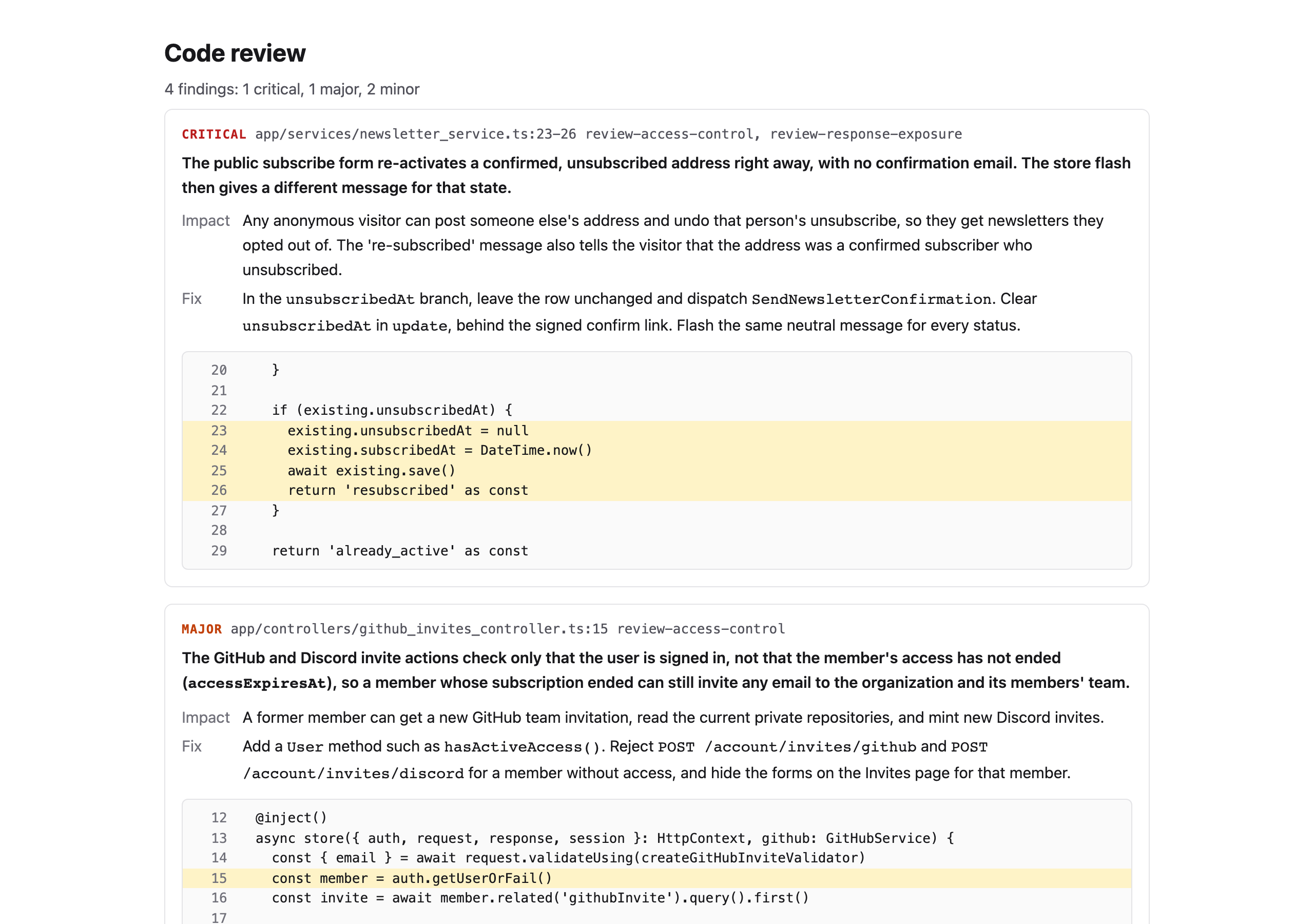
To write the report yourself, run review-report. It reads tmp/code-review.json and writes tmp/code-review.html.
npx @adonisplus/flow review-reportGive another findings file as the argument, and another output file with --out.
npx @adonisplus/flow review-report tmp/code-review.json --out reports/review.html